Protection Modes
Soft Blocking
LightBlocks common ads while keeping most websites fully functional. Perfect for casual browsing.
Pros & Cons
- Minimal impact on website functionality
- Fast browsing experience
- Good for everyday use
- Some ads may still get through
- No tracking protection
Medium Blocking
StandardEnhanced protection that blocks more ad networks and popups for a cleaner browsing experience.
Pros & Cons
- Better ad blocking than soft mode
- Good balance of speed and AD-Blocking
- Blocks most popups
- In rare cases, third-party widgets (such as recommended article feeds) may not appear.
- No tracking protection
Hard Blocking
AdvancedBlocks most major ad networks, offering strong protection. Some websites may rely on these services, which can occasionally cause certain features (like video players or third-party widgets) to stop working. Sites can be whitelisted if needed.
Pros & Cons
- Removes most ads and popups
- Stops many Ad-Networks
- Stronger privacy than Medium mode
- Some website features may not load
- Whitelist may be required on specific sites
Extreme Blocking
MaximumOur strictest mode with 620 rules (compared to 11 in Hard Mode) — over 56× more coverage. Maximum privacy and blocking, but some sites may not work properly.
Pros & Cons
- Blocks ads and most third-party trackers
- Maximum privacy & security
- Prevents many social media trackers
- Some sites may not load correctly
- May slow browsing on weaker connections
- Whitelisting may be needed on trusted sites
Advanced Customization
Whitelist & Blacklist Control
Archnemix allows you to manage how the blocker behaves on different websites. You can whitelist trusted sites to make sure they work without restrictions, or blacklist entire domains to apply stronger blocking rules.
Whitelist means the site is excluded from blocking, while blacklist means all matching content from that domain will be blocked. This gives you flexibility to decide how strict you want protection on a per-site basis.
Our extension includes a simple interface for managing your whitelist and blacklist, so you stay in control of your browsing experience.
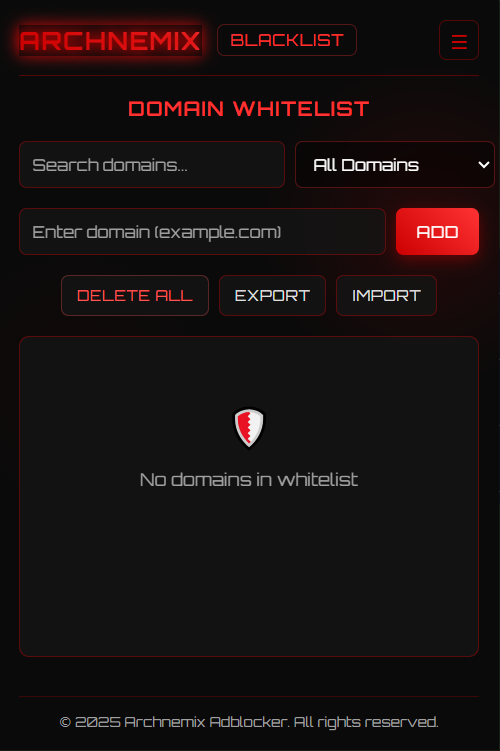
Whitelist Interface
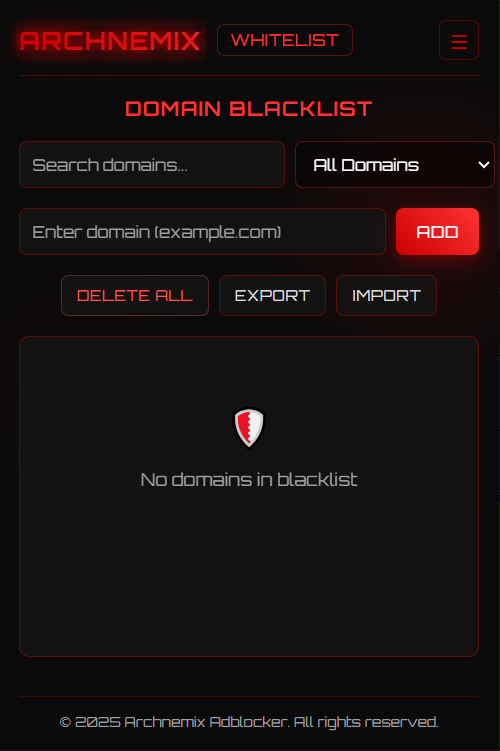
Blacklist Interface
Ready for a Better Browsing Experience?
Install Archnemix Adblocker today and take back control of your browser.
Add to Chrome Add to Firefox⚠️ The extension is not live yet. Download links will be available as soon as it goes live.